
Product and Account Types
Overview
PayMongo offers three types of accounts: Basic Account, Standard Wallet Account and Fully Verified Account.
Each account gives you access to different features, payment methods, and fund transfer capabilities.
Use the table below to understand which tier is right for your business and how to unlock more functionality by upgrading.
Account Comparison
Unlock more Features as you upgrade your AccountUpgrading your Basic Account allows you to unlock more features and powerful tools designed to fuel your growth. Review our Account Creation guide to learn how to upgrade.
Basic Account | Standard Wallet | Fully Verified Account | |
|---|---|---|---|
Available Features |
| Additional features:
| Additional Features:
|
Wallets | Manage and send funds to other PayMongo wallets. | Manage and send funds outside PayMongo wallets | Send funds to external banks and e-wallets via InstaPay and PESONet. |
Transaction Limits | Wallet limit = ₱50k | Unlock different Wallet Types and Transaction Limits | |
Payout Schedule | Weekly | Weekly | Weekly |
Supported Business Types
PayMongo supports a wide range of business types, including:
Individuals
A freelancer or social seller
Sole Proprietorships
Registered businesses owned and run by one individual. In the Philippine context, these are businesses owned by a single person and registered with the Department of Trade and Industry (DTI), requiring a DTI Certificate for verification.
Partnerships
Registered businesses owned by two or more individuals. In the Philippine context, these are businesses formed by two or more persons registered with the Securities and Exchange Commission (SEC), requiring Articles of Partnership and a corporate bank account.
Corporations
Legally separate entities from their owners. In Philippine context, these are your entities registered with the SEC (separate from its owners/shareholders), requiring Articles of Incorporation and a corporate bank account for payouts.
Payment Method Eligibility
Allowed Payment methods is dependent on the Type of Account
| Payment Methods | Individual (No website) | Individual (With Website) | Sole Proprietor | Partnership | Corporation | One Person Corporation (OPC) |
|---|---|---|---|---|---|---|
| QRPH | ✅ | ✅ | ✅ | ✅ | ✅ | ✅ |
| Direct Online Banking (DOB) | ❌ | ✅ | ✅ | ✅ | ✅ | ✅ |
| E-Wallets (Maya, Grab, ShopeePay) | ❌ | ✅ | ✅ | ✅ | ✅ | ✅ |
| E-Wallets (GCash) | ❌ | ❌ | ✅ | ✅ | ✅ | ✅ |
| Debit/Credit Cards, GooglePay | ❌ | ❌ | ✅ | ✅ | ✅ | ✅ |
Configuration for E-wallets and Cards are subject to approval of our providers.
Payment Method Availability
Once your account is activated as a Tier 2 merchant, the following payment methods will be available within a few business days. Your documents are sent to our financial partners for onboarding as part of this process.
| Payment Method | Processing Timeline |
|---|---|
| Cards (Visa, Mastercard) | 5 business days |
| GCash | 5 business days |
| GrabPay | 5 business days |
| Maya | 5 business days |
| BPI Online Banking | 3 business days |
| UnionBank Online Banking | 3 business days |
| BDO, Metrobank, Landbank (via Brankas) | 3 business days |
| BillEase (Buy Now, Pay Later) | Available upon request |
| QR Ph | Automatically enabled upon signup / Tier 1 |
Sandbox modeUse Test Mode in your Dashboard to simulate payments without real charges.
If you don’t see a payment method active after the expected timeline, reach out to [email protected].
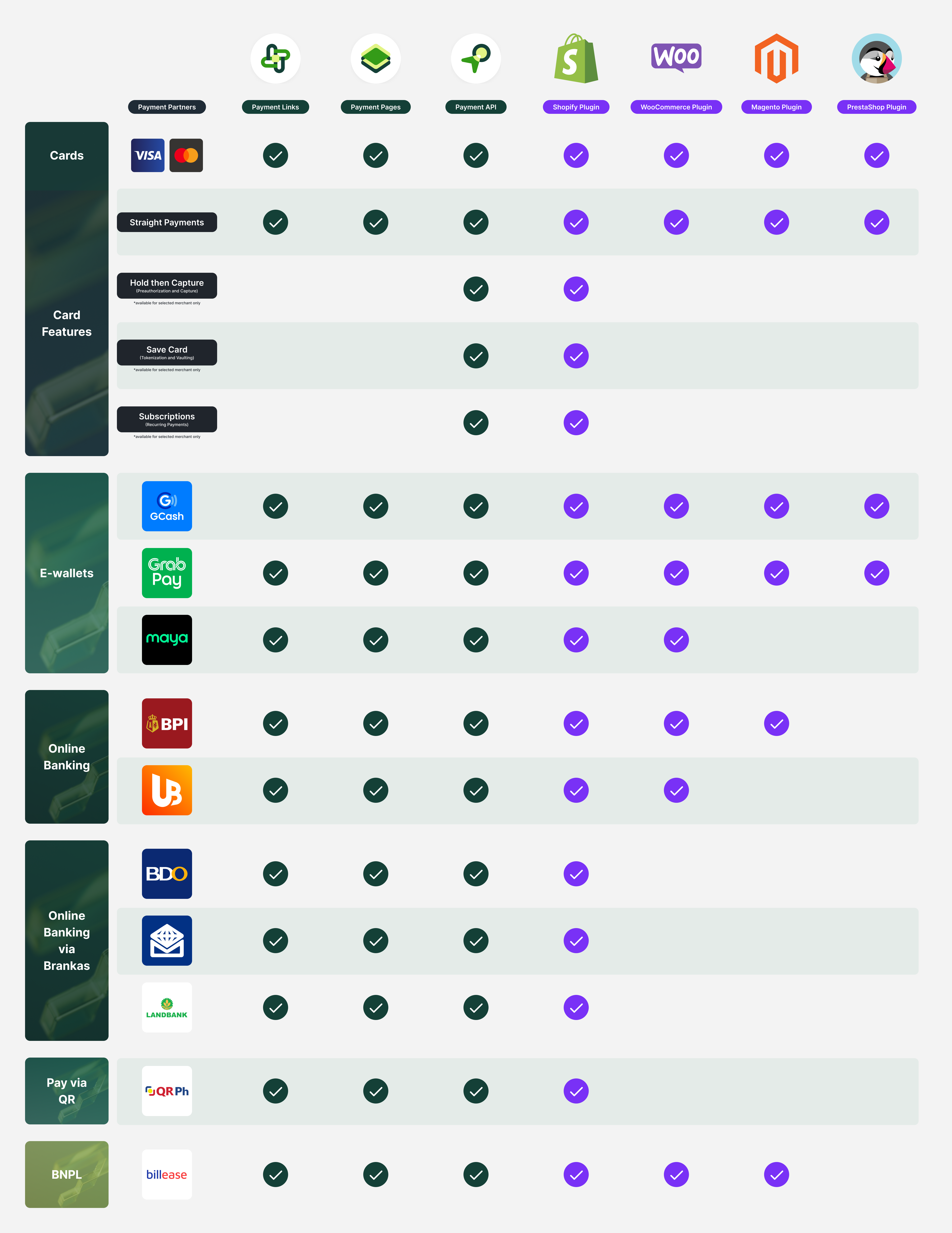
Plugin & Integration Compatibility
The availability of payment methods and features may vary based on your chosen platform or plugin:
⚠️ Bank Payout Requirements for Corporations
To receive payouts to your nominated Business Bank Account, Corporations are required to submit a Duly Notarized Secretary’s Certificate .
Settlement destination is routed to your PayMongo Wallet by default. Please inform us if you'd like it routed to your designated Bank Account.
Please take note that the designated bank account for payouts must be in the name of the corporation, partnership, or sole proprietor registered business name to avoid delays in your payouts. If you do not have either of these, we would like to offer you the option of using our PayMongo Wallets.
✅ The Secretary’s Certificate must:
- Authorize the person transacting on behalf of the company with PayMongo
- Confirm the official settlement account (must be a Business Bank Account — not a personal account)
- Be notarized
- Be signed by the Corporate Secretary or another board member
- Not be self-certifying. (If the Corporate Secretary is the authorized representative, the certificate must be signed by another officer or a notarized Board Resolution containing the authorized representative)
If documentary requirements are incomplete or missing, payouts may be placed on hold until all required documents are submitted and verified.
Supported partners and integrationsPayMongo API, PayMongo Links, Pages, Shopify, WooCommerce, Magento, PrestaShop.
Advanced featuresSome advanced features (e.g. Save Card, Subscriptions) are only available on API or selected plugins.
Updated 3 days ago