
Automatically Direct Payouts to Other Destinations
Overview
A payout is the disbursement of funds from a platform to a merchant or beneficiary, typically representing the settlement amount after fees, taxes, adjustments, refunds, and any disputes. By Default, a PayMongo merchant will be enrolled in a weekly payout on every Wednesday, and the payout will be disbursed automatically to their PayMongo Wallet.
This document demonstrates Payout redirection from one PayMongo Wallet account to a bank account or another PayMongo Wallet using the PayMongo Workflow.
Basic Terminologies
| Term | Definition |
|---|---|
| Payout | Disbursement of funds from PayMongo to the account based on fees, taxes, adjustments, refunds, and any disputes to the respective account’s PayMongo Wallet. |
| Wallet | An electronic wallet issued by PayMongo to store, manage, and move funds between one wallet and another wallet, or a wallet and bank accounts. |
| Workflow | An automation tool that enables you to automate money movements and customize how you move funds within PayMongo wallets or between PayMongo wallets and your Bank Accounts. |
| Parent Account | The primary Platform orchestrator. The primary merchant account registered with the Platform serves as the main contracting entity. It enables the creation and management of linked sub-merchants or child accounts, and remains responsible for their compliance with this Agreement, applicable laws, and Platform rules. |
| Child Account / Sub-account | Sub-merchants or entities managed by the Parent. |
Pre-Requisites
- An activated PayMongo account with PayMongo Wallet
- Workflow feature is enabled in the PayMongo account(s). Kindly contact [email protected] to enable this functionality if it's not enabled.
Proposed Flows
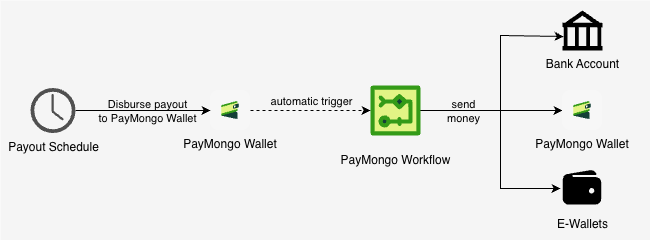
In this scenario, whenever a payout is received by a PayMongo Wallet, an automatic trigger will execute a PayMongo Workflow. The PayMongo Workflow will execute a send_money step(s) which can send the Payout amount to several recipients, such as a bank account, another PayMongo Wallet, or an e-wallet.
Step 1: Create a Workflow
In this step, we will create a workflow definition that transfers the funds received from payouts in the PayMongo Wallet to the intended destination(s). We will use the send_money workflow step for this process. To create a workflow, use the Create a Workflow endpoint.
Resource URL
POST https://workflow-api.paymongo.com/v1/workflowsRequest Example
This endpoint receives a text/plain request body. To include your workflow definition, place it in the request body as raw text.
curl --location 'https://workflow-api.paymongo.com/v1/workflows' \
--header 'Content-Type: text/plain' \
--header 'Organization-Id: org_k92tXwQfLJm8aZyR4vB1cNd7'\
--header 'Authorization: Basic xxxxxx==' \
--data 'version: 1
name: "send-money-from-payout"
description: "Send money from Payout"
steps:
    - send_money:
        source:
            type: "wallet"
            account: "${merchant_account_number}"
        destination:
            type: "bank"
            account: "123456789012"
            account_name: "ACCOUNT NAME 1"
            bic: "RCBCPHMMXXX"
        provider: "auto"
        amount: "${net_amount}"
        currency: "PHP"
        notes: "Payout Disbursement"'
To check the details of send_money, kindly refer to the Send Money Step documentation . Based on the definition example, you can leave the source.account and amount parameters as is.
- The
source.accountparameter will be automatically filled by the trigger - The amount parameter will be automatically filled by the trigger.
For the provider, kindly change the value as follows:
provider = autoif thedestination.typeisbank. The Workflow engine will automatically chooseinstapayorpesonetprovider depending on the transfer amount.provider = paymongoif thedestination.typeiswallet.
Besides sending money to your bank account, you can also set the payout to another Paymongo Wallet, or you can also do a split payout with a percentage, as follows:
curl --location 'https://workflow-api.paymongo.com/v1/workflows' \
--header 'Content-Type: text/plain' \
--header 'Organization-Id: org_k92tXwQfLJm8aZyR4vB1cNd7'\
--header 'Authorization: Basic xxxxxx==' \
--data 'version: 1
name: "send-money-from-payout"
description: "Send money from Payout"
steps:
    - compute:
        outputs:
          bank_share: "monetary_percent(input.net_amount, 6000)
          wallet_share: "input.net_amount - bank_share"
    - send_money:
        source:
            type: "wallet"
            account: "${merchant_account_number}"
        destination:
            type: "bank"
            account: "123456789012"
            account_name: "ACCOUNT NAME 1"
            bic: "RCBCPHMMXXX"
        provider: "auto"
        amount: "${steps.calc_split.output.bank_share}"
        currency: "PHP"
        notes: "Payout Disbursement"
    - send_money:
        source:
            type: "wallet"
            account: "${merchant_account_number}"
        destination:
            type: "wallet"
            account: "775447521930"
            account_name: "PayMongo Wallet 1"
            bic: "PAEYPHM2XXX"
        provider: "paymongo"
        amount: "${steps.calc_split.output.wallet_share}"
        currency: "PHP"
        notes: "Payout Disbursement to Parent Account"'
The example above shows that you can split the amount from the payout using the compute step. The compute step will output two parameters
bank_share: 60% (the 6000 is in cents), of the payout amount.wallet_share: the payout amount deducted by thebank_share
The output of the compute step can then be used as the send_money.amount input by referencing it as "${steps.calc_split.output.wallet_share}" or "${steps.calc_split.output.bank_share}".
Response
Example response of the Workflow Creation:
{
    "id": "flow-J08KdKADWGgX1y3",
    "organization_id": "org_k92tXwQfLJm8aZyR4vB1cNd7",
    "name": "send-money-from-payout",
    "description": "Send money from Payout",
    "definition": {
        "steps": [
            {
                "action_name": "send_money",
                "amount": "${net_amount}",
                "currency": "PHP",
                "destination": {
                    "account": "123456789012",
                    "account_name": "ACCOUNT NAME 1",
                    "bic": "RCBCPHMMXXX",
                    "type": "bank"
                },
                "notes": "Payout Disbursement",
                "provider": "auto",
                "source": {
                    "account": "${merchant_account_number}",
                    "account_name": "",
                    "bic": "",
                    "payment_id": "",
                    "type": "wallet"
                }
            }
        ],
        "version": 1
    },
    "created_at": "2026-01-14T02:39:34.910765Z",
    "updated_at": "2026-01-14T02:39:34.910765Z"
}
Step 2: Create Trigger
In this step, we will attach a trigger to automatically execute the workflow that we created in the previous step. To create a trigger, you can use the Create a Trigger endpoint.
Resource URL
POST https://workflow-api.paymongo.com/v1/triggersRequest Example
This endpoint receives an application/json request body with two parameters: workflow_id and condition. Leave the condition parameter as shown in the example below:
curl --location 'https://workflow-api.paymongo.com/v1/triggers' \\
--header 'Content-Type: application/json' \
--header 'Organization-Id: org_k92tXwQfLJm8aZyR4vB1cNd7'\
--header 'Authorization: Basic xxxxxx==' \
--data '{
    "workflow_id": "flow-J08KdKADWGgX1y3",
    "condition": {
        "event_name": "payout.deposited",
        "channel": "paymongo"
    }
}'
Response
{
    "data": {
        "id": "tr-1kEVLSVJMKhY5Vh",
        "organization_id": "org_k92tXwQfLJm8aZyR4vB1cNd7",
        "workflow_id": "flow-J08KdKADWGgX1y3",
        "state": "active",
        "condition": {
            "channel": "paymongo",
            "event_name": "payout.deposited"
        },
        "created_at": "2026-01-14T02:56:32.704988217Z",
        "updated_at": "2026-01-14T02:56:32.704988307Z",
        "deleted_at": null
    }
}
Updated about 1 month ago