
Taxes
Learn how tax regulations apply to your account based on how you use our platform.
This page applies to businesses operating in the Philippines.
In accordance with applicable BIR regulations (including Revenue Regulations No. 16-2023 and related issuances), these regulations require covered entities to apply withholding tax on qualified gross remittances once applicable thresholds and conditions are met.
Regulation: RR No. 16-2023
- Purpose: Imposed the creditable withholding tax (CWT) on gross remittances by e-marketplace operators and digital financial services providers to sellers/merchants. Originally set at 1% on one-half (1/2) of gross remittances. Amended Section 2.57.2(X) of RR No. 2-98.
Regulation: RR No. 5-2025
- Purpose: Pursuant to R.A. No. 12066, further amends Section 2.57.2(X) of RR No. 2-98 by updating the withholding tax rate to one-half percent (1/2%) on gross remittances.
How Does Withholding Tax Work?
Does PayMongo withhold tax? Yes, we are required to withhold a specific amount of tax from your payouts and remit it to the Bureau of Internal Revenue (BIR).
How is it calculated? Under RR No. 5-2025, Section 2, amending Section 2.57.2(X) of RR No. 2-98: The gross remittances by e-marketplace operators and digital financial services providers to the sellers/merchants for the goods or services sold/paid through their platform/facility is One-half percent (1/2%). This supersedes the original 1% rate on one-half of gross remittances under RR No. 16-2023.
- This means, under BIR Revenue Regulations, we must withhold 0.5% withholding tax on your gross remittance.
When does this apply? This deduction applies if you are not part of the exemption listed. This deduction is seen as a debit adjustment in your payout report.
How do I get my Forms?:
- Get your Form 2307: If tax was deducted, you can download your Certificate of Creditable Tax Withheld (BIR Form 2307) from your dashboard at Settings > Taxes.
Important Note for Top Withholding Agents (TWA): If you are a top authorized withholding agent (TWA) of the BIR, we can refund back 2% of our VAT-exclusive service fees to you. In this scenario, you are the withholding agent. This requires you to provide us with BIR form 2307 evidencing the refunded withholding tax amount monthly.
Merchants who are tagged as authorized withholding agents on our system will receive the refund as part of their payout.
Reach out to [email protected] for further assistance.
Who is Exempted?
The following are generally not subject to withholding tax, subject to applicable rules and validation:
- Foreign merchants
- Lending and financing services
- Traditional remittance providers
- Aggregator platforms acting purely as intermediaries
- Pass-through marketplaces with no control over settlement
- Government entities (excluding certain government-owned corporations)
- Charities, religious organizations, and other tax-exempt entities
The withholding tax shall also not apply in the following instances. These exemptions remain in effect under RR No. 5-2025.
-
Exemption A — Prior-Year Gross Remittance Threshold
The annual total gross remittances to an online seller/merchant for the past taxable year has not exceeded ₱500,000.00.
What this means: If your total gross remittances received through the platform for the entire previous taxable year did not exceed ₱500,000, the withholding tax does not apply.
-
Exemption B — Current-Year Cumulative Threshold
The cumulative gross remittances to an online seller/merchant in a taxable year has not yet exceeded ₱500,000.00.
What this means: Even if you did not qualify under Exemption A, the withholding tax will not apply until your cumulative gross remittances within the current taxable year exceed ₱500,000. Once the threshold is breached, the withholding tax applies to subsequent remittances.
For Exemption A or B: You are required to provide a signed Sworn Declaration and BIR COR 2303 (For Registered businesses).
-
📄Sworn Declaration Template- Download the official template here.
-
📋 Review the Guidelines for Filling Up the Sworn Declaration- Please read this before completing the form.
-
-
Exemption C — Tax Exemption or Preferential Rate under Existing Law or Treaty
The seller/merchant is duly exempt from or subject to a lower income tax rate pursuant to any existing law or treaty.
What this means: If your business is entitled to an income tax exemption or a reduced income tax rate under Philippine law or an applicable tax treaty, you may be exempt from or subject to a reduced withholding tax rate.
To claim this exemption, you must: Secure the necessary certification, clearance, ruling, or any other document serving as proof of entitlement to the exemption or lower tax rate. Submit your valid tax exemption document(s) to PayMongo through [email protected] with the subject line [Digital Tax Exemption] Document Submission (Merchant Name). Once validated, the applicable exemption will be applied.
I am a Non-Resident Digital Service Provider (Foreign Merchant)
If you operate outside the Philippines, Withholding Digital VAT (BIR RR No. 3-2025) shall apply.
Digital services consumed in the Philippines are subject to 12% VAT under BIR RR No. 3-2025. Depending on the transaction structure and the parties involved, VAT may be required to be remitted directly by the provider or withheld and remitted by a Philippine entity acting as withholding agent.
What happens next
- If taxes were withheld: Download your BIR Form 2307 from the dashboard and provide it to your accountant. This allows you to claim tax credits when filing your income tax return.
- If no taxes were withheld: You are responsible for declaring your full income and paying any necessary income taxes directly to the BIR.
Generating BIR 2307
You can generate and download this form directly from your dashboard. Please follow these steps:
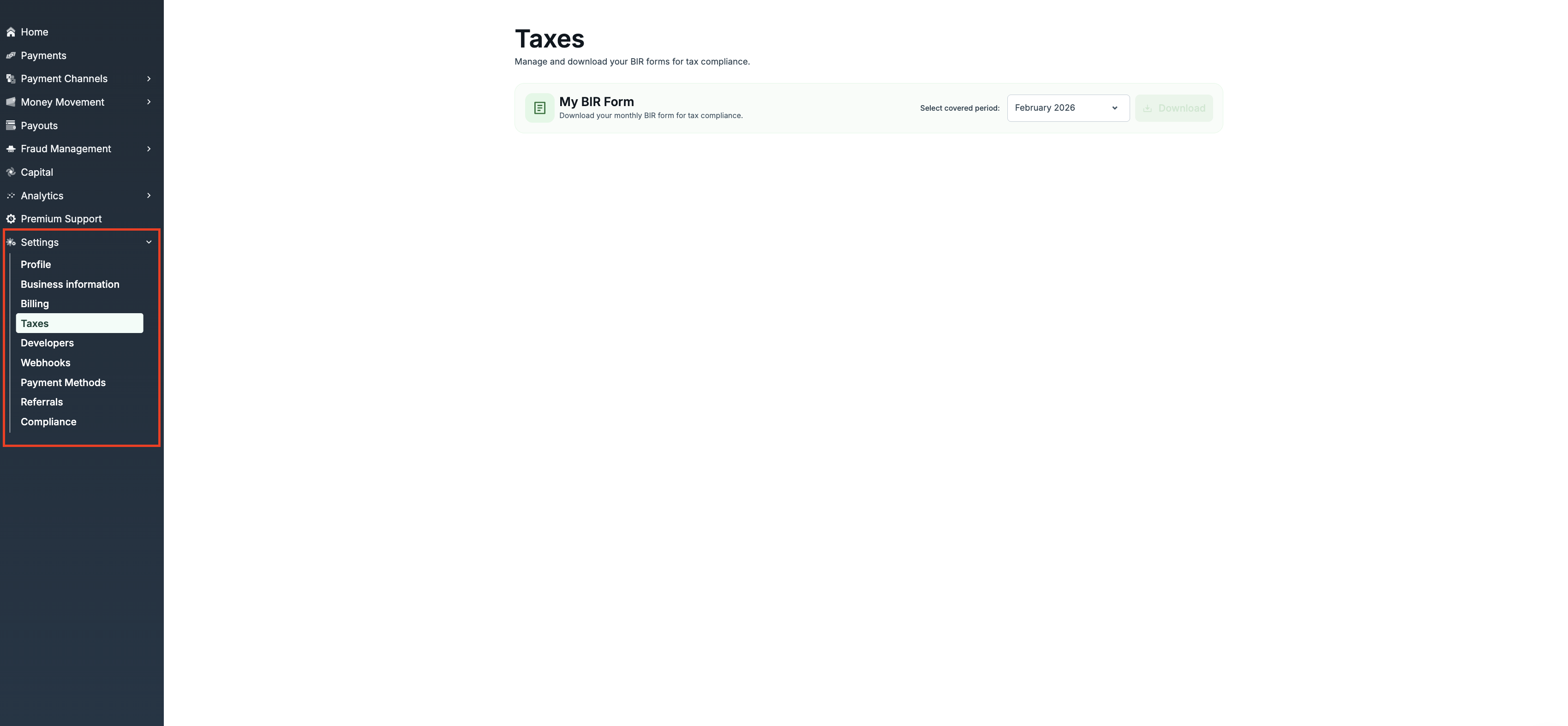
- Log in to your dashboard.
- On the left sidebar, click on Settings.
- Select the Taxes tab from the menu list. (You can also go directly to https://dashboard.paymongo.com/taxes).
- Locate the section for BIR Form 2307.
- Select the relevant date range or quarter you need.
- Click the button to generate or download your form.
Once downloaded, save the file for your records. You should provide this document to your accountant or bookkeeper when preparing your quarterly or annual income tax filings to claim your tax credits.
Updated 17 days ago