
Payment Method & Eligibility
Overview
Upon activation, you're already able to accept QRPH payments for both Online & In-Store.
If you wish to access more payment methods, you can make a request to configure your preferred payment methods by navigating to your Settings Side panel, then navigating to Payment Methods.
Note that Payment Method Eligibility is dependent on the Business Type of your Account.
Business Type Comparison
Unlock more Features as you upgrade your AccountUpgrading your Business Type allows you to unlock more features and powerful tools designed to fuel your growth. Review our Account Creation guide to learn how to upgrade.
Individual (Unregistered) | Registered Account (Sole Proprietorship, Partnership, OPC, Corporation) | |
|---|---|---|
Available Features |
| Additional Features:
|
Wallets |
|
|
Transaction Limits | Wallet limit = ₱50k | Unlock different Wallet Types and Transaction Limits |
Supported Business Types
PayMongo supports a wide range of business types, including:
Individuals
A freelancer or social seller who owns the business. In the Philippine context, these are businesses not registered with DTI
Sole Proprietorships
Registered businesses owned and run by one individual. In the Philippine context, these are businesses owned by a single person and registered with the Department of Trade and Industry (DTI), requiring a DTI Certificate for verification.
Partnerships
Registered businesses owned by two or more individuals. In the Philippine context, these are businesses formed by two or more persons registered with the Securities and Exchange Commission (SEC), requiring Articles of Partnership and a corporate bank account.
One Person Corporations (OPC)
Registered businesses owned by a single individual but with a separate legal personality. In the Philippine context, these are corporations registered with the Securities and Exchange Commission (SEC) under the One Person Corporation framework, requiring Articles of Incorporation and a corporate bank account for payouts.
Corporations
Legally separate entities from their owners. In Philippine context, these are your entities registered with the SEC (separate from its owners/shareholders), requiring Articles of Incorporation and a corporate bank account for payouts.
Payment Method Eligibility
Allowed Payment methods is dependent on the Type of Account
Pre-Requisites for Requesting Additional Payment Methods
- Accomplish and pass the Liveness Check of your account.
- Your account has been provisioned an Enabled wallet.
| Payment Methods | Individual (No website) | Individual (With Website) | Sole Proprietor | Partnership | Corporation | One Person Corporation (OPC) |
|---|---|---|---|---|---|---|
| QRPH | ✅ | ✅ | ✅ | ✅ | ✅ | ✅ |
| Direct Online Banking (DOB) | ❌ | ✅ | ✅ | ✅ | ✅ | ✅ |
| E-Wallets (Maya, Grab, ShopeePay) | ❌ | ✅ | ✅ | ✅ | ✅ | ✅ |
| E-Wallets (GCash) | ❌ | ❌ | ✅ | ✅ | ✅ | ✅ |
| Debit/Credit Cards, GooglePay | ❌ | ❌ | ✅ | ✅ | ✅ | ✅ |
Configuration for E-wallets and Cards are subject to approval of our providers.
Requesting Payment Methods
- In your PayMongo Dashboard navigate to your Settings Side Tab > Payment Methods.
- Make sure that you have an Enabled Wallet first before requesting for Payment Methods. If you still have a Closed-loop wallet, you'll be asked to upgrade your wallet.
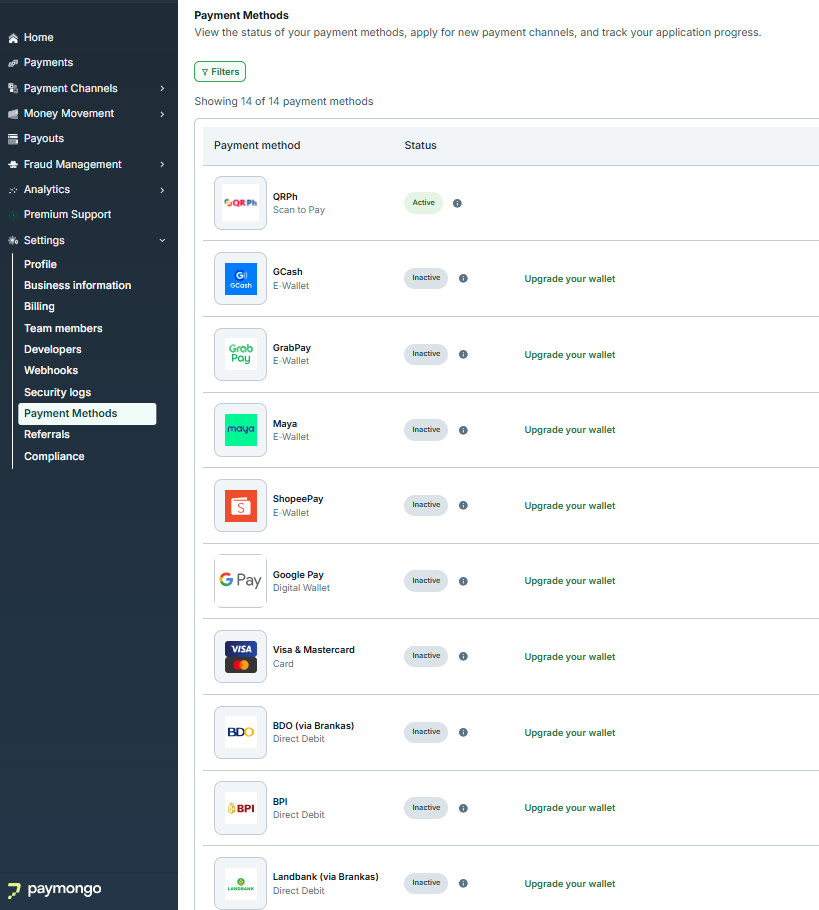
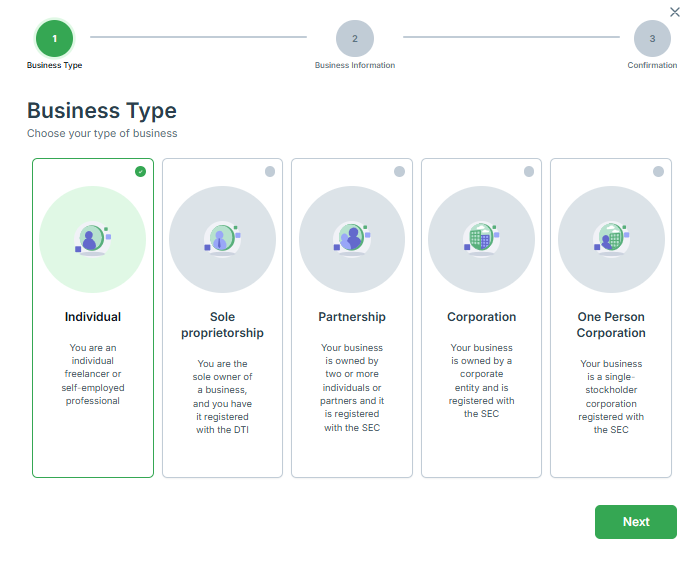
- Once your wallet is Enabled, you can select your desired Payment Method and click Activate where you'll be asked to select your Business Type and upload the necessary documents to proceed.
- Note that Payment Method Eligibility is dependent on the Business Type of your Account.
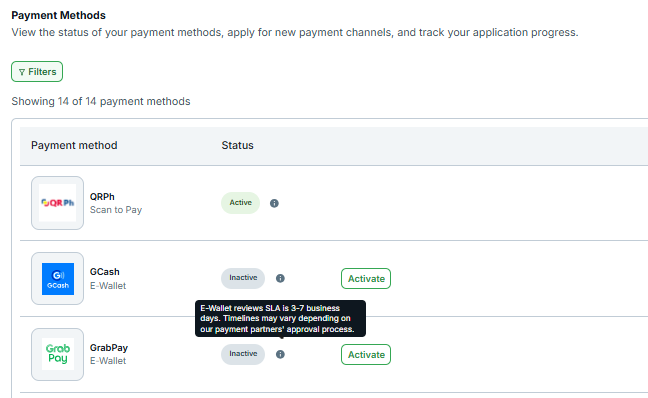
- Once your request is submitted, the Status will change to "Under Review" which means it's routed to the Onboarding team for review. You can monitor the progress of your application directly in your PayMongo Dashboard.
- Check out the tool-tip for each payment method to understand the SLAs for each payment method.
Payment Method Availability
Once the Business Type of your account is successfully reviewed, we'll route your Payment Method Request to our financial partners for onboarding. Your documents are sent to our financial partners for onboarding as part of this process.
| Payment Method | Processing Timeline |
|---|---|
| Cards (Visa, Mastercard) | 5-10 business days |
| GooglePay | 1-3 business days if already configured for cards |
| GCash | 3-7 business days |
| GrabPay | 3-7 business days |
| Maya | 3-7 business days |
| ShopeePay | 3-7 business days |
| BPI Online Banking | 1-3 business days |
| UnionBank Online Banking | 1-3 business days |
| BDO, Metrobank, Landbank (via Brankas) | 1-3 business days |
| BillEase (Buy Now, Pay Later) | 2-3 business days |
| QR Ph | Automatically enabled upon sign-up |
Sandbox modeUse Test Mode in your Dashboard to simulate payments without real charges.
If you don’t see a payment method active after the expected timeline, reach out to [email protected].
Plugin & Integration Compatibility
The availability of payment methods and features may vary based on your chosen platform or plugin:
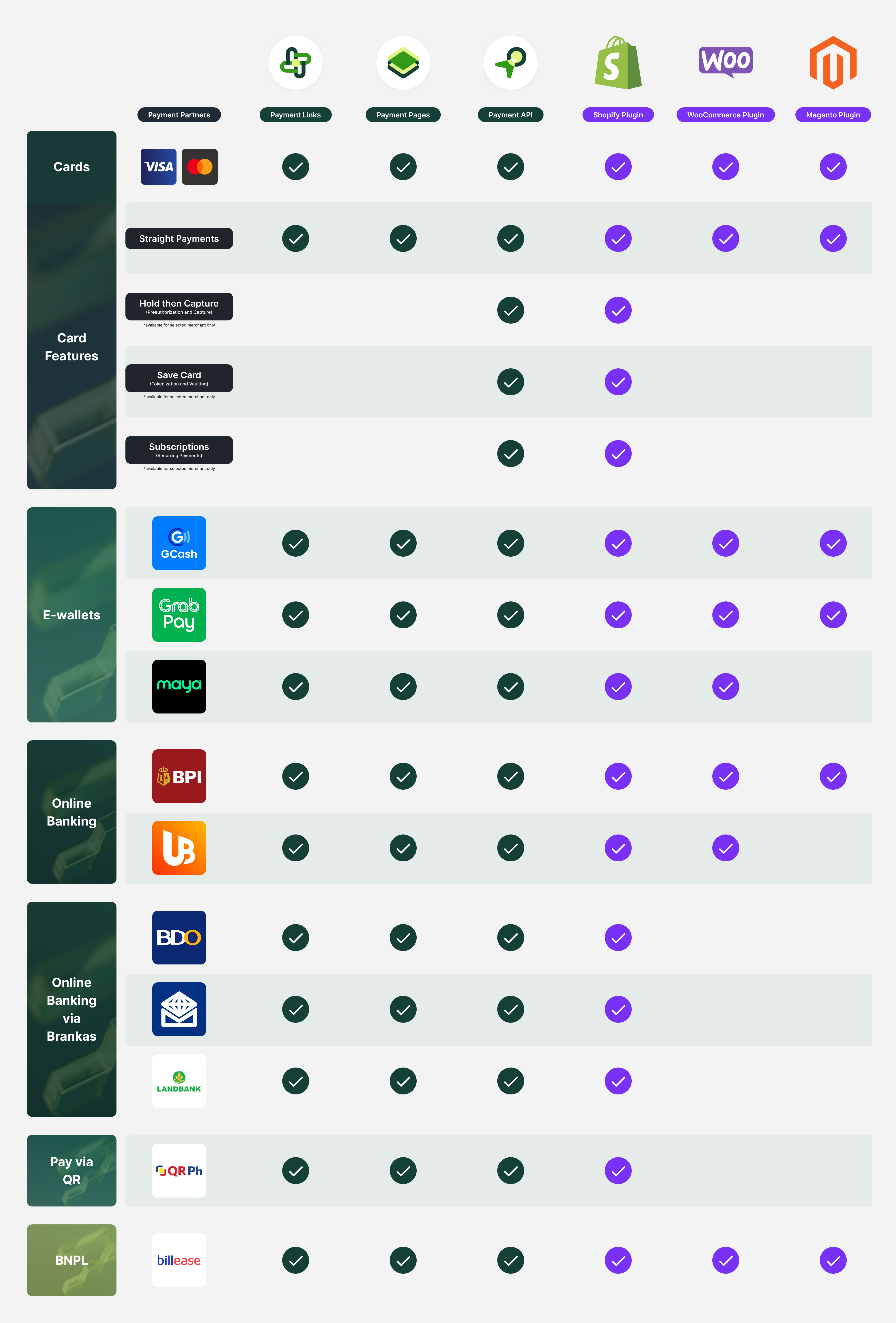
Supported partners and integrationsPayMongo API, PayMongo Links, Pages, Shopify, WooCommerce, Magento, PrestaShop.
Advanced featuresSome advanced features (e.g. Save Card, Subscriptions) are only available on API or selected plugins.
Updated 30 days ago