
Schedule a Money Transfer from your Paymongo Wallet
This guide gives you example(s) on how you can schedule a money transfer from your PayMongo Wallet.
Overview
When you create a workflow, you can set it to execute automatically according to a schedule. This schedule uses a cron-based format in the UTC timezone. When the scheduled expression matches the current UTC time, PayMongo will automatically execute your specified workflow.
Cron-Schedule Format
The cron schedule is based on this format:
┌───────────── minute (0 - 59)
│ ┌───────────── hour (0 - 23)
│ │ ┌───────────── day of the month (1 - 31)
│ │ │ ┌───────────── month (1 - 12)
│ │ │ │ ┌───────────── day of the week (0 - 6) (Sunday to Saturday)
│ │ │ │ │
│ │ │ │ │
* * * * *
Based on the schedule format, you can use the crontab guru site to test your cron expressions. Here are some of the schedules that you can use to execute a workflow:
| Cron Schedule | Description |
|---|---|
* * * * * | Every minute |
0 * * * * | Every hour, at the start of the hour |
0 0 * * * | Every day at midnight (UTC) |
15 8 * * * | Every day at 8:15 AM (UTC) |
0 0 * * 0 | Every week on Sunday at midnight (UTC) |
0 0 1 * * | Every month on the 1st at midnight (UTC) |
0 0 1 1 * | Every year on January 1st at midnight (UTC) |
30 9 * * 1-5 | Every weekday (Mon–Fri) at 9:30 AM (UTC) |
0 0,12 * * * | Twice a day at midnight and noon (UTC) |
0 12 * * 1 | Every Monday at noon (UTC) |
Pre-Requisites
- An activated PayMongo account with PayMongo Wallet
- Workflow feature is enabled in the PayMongo account(s). Kindly contact [email protected] to enable this functionality if it's not enabled.
Proposed Flows
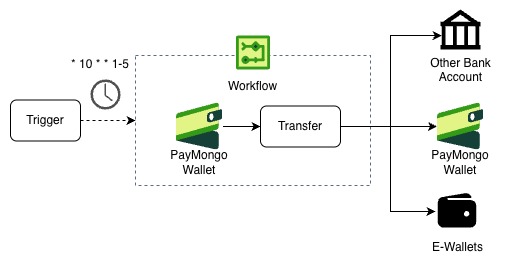
In this scenario, you can create a trigger based on a cron expression that automatically executes a workflow to send money from a PayMongo wallet to one or many destinations at a predetermined schedule.
Step 1: Create a Workflow
In this step, we will create a workflow definition that transfers the funds received from the PayMongo Wallet to the intended destination(s). We will use the send_money workflow step for this process. To create a workflow, use the Create a Workflow endpoint.
Resource URL
POST https://workflow-api.paymongo.com/v1/workflowsRequest Example
This endpoint receives a text/plain request body. To include your workflow definition, place it in the request body as raw text.
curl --location 'https://workflow-api.paymongo.com/v1/workflows' \
--header 'Content-Type: text/plain' \
--header 'Organization-Id: org_k92tXwQfLJm8aZyR4vB1cNd7'\
--header 'Authorization: Basic xxxxxx==' \
--data 'version: 1
name: "daily-sweep-wallet-balance"
description: "Scheduled daily sweep from merchant wallet to bank, keeping PHP 100 reserve"
steps:
  - name: "check_balance"
    get_wallet_balance:
      wallet_account: "516646818064"
  - name: "sweep"
    compute:
      outputs:
        balance: "steps['check_balance']['output']['available_balance']"
        min_reserve: "10000"
        sweep_amount: "monetary_max(balance - min_reserve, 0)"
  - name: "send-to-bank"
    send_money:
      provider: "auto"
      source:
        type: "wallet"
        account: "516646818064"
        account_name: "TestAccount1"
        bic: ""
      destination:
        type: "bank"
        account: "881234567890"
        account_name: "Unlimited Money Ltd"
        bic: "UBPHPHMMXXX"
      amount: "${steps.sweep.output.sweep_amount}"
      currency: "PHP"
      purpose: "99"
      notes: "Daily sweep balance from merchant wallet to merchant bank"'
curl --location 'https://workflow-api.paymongo.com/v1/workflows' \
--header 'Content-Type: text/plain' \
--header 'Organization-Id: org_k92tXwQfLJm8aZyR4vB1cNd7'\
--header 'Authorization: Basic xxxxxx==' \
--data 'version: 1
name: "daily-sweep-wallet-balance-to-parent-wallet"
description: "Scheduled daily sweep from merchant wallet to parent wallet"
steps:
- name: "check_balance"
get_wallet_balance:
wallet_account: "516646818064"
- name: "send-to-bank"
send_money:
provider: "paymongo"
source:
type: "wallet"
account: "516646818064"
account_name: "TestAccount1"
bic: ""
destination:
type: "wallet"
account: "775447521930"
account_name: "TestAccount2"
bic: "PAEYPHM2XXX"
amount: "${steps.check_balance.output.available_balance}"
currency: "PHP"
purpose: "99"
notes: "Scheduled daily sweep from merchant wallet to parent wallet"'curl --location 'https://workflow-api.paymongo.com/v1/workflows' \
--header 'Content-Type: text/plain' \
--header 'Organization-Id: org_k92tXwQfLJm8aZyR4vB1cNd7'\
--header 'Authorization: Basic xxxxxx==' \
--data 'version: 1
name: "scheduled-send-to-e-wallet"
description: "Scheduled send money to e-wallet"
steps:
- name: "send-to-bank"
send_money:
provider: "auto"
source:
type: "wallet"
account: "516646818064"
account_name: "TestAccount1"
bic: ""
destination:
type: "bank"
account: "09154255642"
account_name: "John Doe"
bic: "GXCHPHM2XXX"
amount: "60000"
currency: "PHP"
purpose: "99"
notes: "Scheduled send money to e-wallet"'In the example scenarios above, we cover three different scenarios:
- Sweeping or sending all of the wallet balances
- To get the current balance of the wallet, we can use the
get_wallet_balancestep, namedcheck_balance - We excluded 100 PHP (
10000in cents set asmin_reserve) to a bank account using thecomputestep named assweep. The reason for the minimum reserve in thecomputestep is to ensure that you can cover the Transfer Fee (default to 10PHP) for every transfer from a PayMongo Wallet to an external Bank Account or e-wallet. If the wallet balance is less than 100 PHP,sweep_amountbecomes0, so no transfer is sent. This prevents the workflow from attempting a zero-amount transfer, which would fail.
- To get the current balance of the wallet, we can use the
- Sweeping all of the wallet balances to another PayMongo Wallet.
- Sending money to another e-wallet.
To check the details of send_money, kindly refer to the Send Money Step documentation . For the provider, kindly change the value as follows:
provider = autoif thedestination.typeisbank. The Workflow engine will automatically chooseinstapayorpesonetprovider depending on the transfer amount.provider = paymongoif thedestination.typeiswallet.
Example Response
{
    "id": "flow-tZpva8OACfkmCBO",
    "organization_id": "org_k92tXwQfLJm8aZyR4vB1cNd7",
    "name": "daily-sweep-wallet-balance-to-parent-wallet",
    "description": "Scheduled daily sweep from merchant wallet to parent wallet",
    "livemode": true,
    "definition": {
        "steps": [
            {
                "action_name": "get_wallet_balance",
                "name": "check_balance",
                "wallet_account": "516646818064"
            },
            {
                "action_name": "send_money",
                "amount": "${steps.check_balance.output.available_balance}",
                "currency": "PHP",
                "destination": {
                    "account": "775447521930",
                    "account_name": "TestAccount2",
                    "bic": "PAEYPHM2XXX",
                    "type": "wallet"
                },
                "notes": "Scheduled daily sweep from merchant wallet to parent wallet",
                "provider": "paymongo",
                "purpose": "99",
                "source": {
                    "account": "516646818064",
                    "account_name": "TestAccount1",
                    "bic": "",
                    "payment_id": "",
                    "type": "wallet"
                }
            }
        ],
        "version": 1
    },
    "created_at": "0001-01-01T00:00:00Z",
    "updated_at": "0001-01-01T00:00:00Z"
}
Step 2: Create Trigger
In this step, we will attach a trigger to automatically execute the workflow that we created in the previous step. To create a trigger, you can use the Create a Trigger endpoint.
Resource URL
POST https://workflow-api.paymongo.com/v1/triggersRequest Example
This endpoint receives an application/json request body with two parameters: workflow_id and condition as follows:
curl --location 'https://workflow-api.paymongo.com/v1/triggers' \
--header 'Content-Type: application/json' \
--header 'Organization-Id: org_k92tXwQfLJm8aZyR4vB1cNd7'\
--header 'Authorization: Basic xxxxxx==' \
--data '{
    "workflow_id": "flow-tZpva8OACfkmCBO",
    "condition": {
        "schedule": "*/2 * * * *"
    }
}'
Response
{
    "data": {
        "id": "tr-MmNK7Ddb0equJ6g",
        "organization_id": "org_k92tXwQfLJm8aZyR4vB1cNd7",
        "workflow_id": "flow-tZpva8OACfkmCBO",
        "livemode": true,
        "state": "active",
        "condition": {
            "schedule": "*/2 * * * *"
        },
        "created_at": "2026-03-26T13:22:27.305357105Z",
        "updated_at": "2026-03-26T13:22:27.305357189Z",
        "deleted_at": null
    }
}
Updated 20 days ago